 PowerCloud
Deploying a design with Claude Code
How to have Claude Code, Anthropic's AI coding assistant for the terminal, carry out one of PowerCloud's six deployment designs - who does what, project setup, passphrase handling, the step-by-step workflow and a ready-to-paste prompt for each design.
Claude Code is Anthropic's AI coding assistant: it runs in your terminal or IDE, reads and edits files, and runs shell commands after asking your permission. It can do most of the legwork of building one of the six deployment designs: reading these docs, planning, uploading images, launching instances and checking the cluster with pcctl. The key idea is a split: Claude Code prepares, runs and checks, while you keep every secret, type every passphrase and approve every command.
For the general rules any AI assistant should follow with PowerCloud (which secrets it must never handle, which commands need a yes first), see Using PowerCloud with an AI assistant. This page applies them to Claude Code and to each design.
Who does what

| Claude Code can | Only you do |
|---|---|
Read the docs: https://powercloud.unidatum.com/llms.txt (the index) and any page as Markdown, such as https://powercloud.unidatum.com/docs/designs.md |
Choose the cluster passphrase and type it |
| Write a plan for your design and keep it in the project | Write down the recovery key that pcctl init prints once, and store it offline |
Run read-only pcctl commands: pcctl status, pcctl node ls, pcctl node info NAME, pcctl consensus status, pcctl s3 status, pcctl node attest NAME |
Log in to your cloud CLIs (aws, gcloud, az) |
Check downloads with sha256sum, and run scripts/aws-image.sh, scripts/gcp-image.sh or scripts/azure-image.sh with your cloud CLI login |
Anything that needs sudo, such as writing an image to a disk with dd |
| Launch instances and set up security groups with your cloud CLI | Read an enrollment or unlock code from a physical console, when a node has no join bundle |
Provision join bundles (pcctl node provision), if you exported the passphrase for it |
Approve each command Claude Code asks to run |
| Run changes you have confirmed, one at a time | Decide on destructive steps: node rm, rm, gc, rotate and the rest of the confirm list |
Setting up a project
Give the deployment its own directory. Claude Code works in the directory you start it from, and you can keep the plan, a deployment log and any scripts there.
mkdir -p ~/pc-deploy && cd ~/pc-deploy
git init                        # optional, for the plan and the log
printf '*.join\n.env\nconfig/\n' > .gitignore
Keep out of version control, and out of the project if you can:
- Join bundles (
*.join). Each holds a node's private keys and disk key. Delete each one once its node is up. - The pcctl config directory. It holds your admin certificate and key. By default it is
~/.config/powercloudon Linux and~/Library/Application Support/powercloudon macOS, outside the project; leavePOWERCLOUD_CONFIGunset unless you have a reason. - Cloud credentials. Log in with the provider's own CLI (for example
aws configureoraws sso login,gcloud auth login,az login) in your own terminal. Never paste access keys into the chat: whatever you type there is stored in the conversation.
A CLAUDE.md for the deployment
Claude Code reads CLAUDE.md in the project directory at the start of each session and follows it. Start from the snippet in Using PowerCloud with an AI assistant and add your design's specifics. This template is for design 1; change the design, names and variables to yours:
# PowerCloud deployment

## The design
- Design 1 from https://powercloud.unidatum.com/docs/designs.md: one home server
  (home-1) with encrypted copies in two buckets (Cloudflare R2 and Backblaze B2).
- Node names: home-1. Architecture: amd64.
- Storage locations: in POWERCLOUD_REPO, set by me. Bucket credentials: R2_* and B2_*
  variables, set by me. Never write their values in any file.

## Docs
- Index: https://powercloud.unidatum.com/llms.txt. Commands: /docs/pcctl.md.
  Read the page for a step before proposing its commands; never guess a flag.

## Rules
- Start each session with `pcctl status` and read deploy-log.md.
- One step at a time: say what the step does, show the exact command, wait for my yes.
- Never ask for, print, store or commit the passphrase, the recovery key,
  enrollment codes, join bundles (*.join), S3 secret keys or the pcctl config directory.
  Never cat a .join file or echo a credential variable.
- Commands that need the passphrase (anything with --repo or --via, see /docs/ai-agents.md):
  give me the exact command to run in my own terminal, unless POWERCLOUD_PASSPHRASE
  is already set in your environment.
- I run `pcctl init` myself, always.
- Ask before: node rm, gc, rm, rotate, revoke-admins, release publish, node upgrade,
  node poweroff/reboot, app rm, cluster app rm, s3 key rm, s3 disable, node tpm off.
- After each step, append what was done and its result to deploy-log.md (no secrets).
The passphrase, in Claude Code
Most pcctl commands that change the cluster need the cluster passphrase. Two things about Claude Code decide how you supply it:
- Each command Claude Code runs is a fresh shell. An
exportin one command doesn't carry to the next, so Claude Code can't set a variable once and use it later. It gives the full--repo LOC,...on each command, or relies on variables that were already in its environment when you started it. - pcctl prompts on a terminal, and Claude Code's commands don't have one. A command that needs the passphrase stops with
pcctl: no terminal for passphrase; set POWERCLOUD_PASSPHRASE (and POWERCLOUD_NEW_PASSPHRASE for rotate).
So pick one of two ways, and say which in CLAUDE.md:
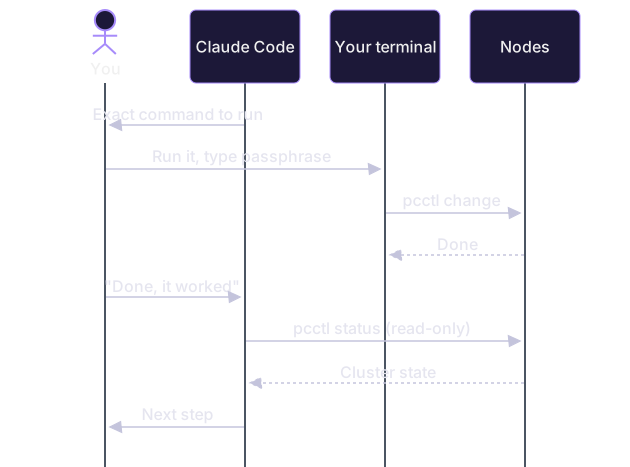
- You run passphrase commands in your own terminal. Claude Code writes out the exact command; you run it in a separate terminal window, type the passphrase at the prompt, and tell Claude Code the result (or paste output that holds no secret). This is the safer way, and the one to use by default.
- You export the passphrase before starting Claude Code. In your own terminal,
read -rs POWERCLOUD_PASSPHRASE && export POWERCLOUD_PASSPHRASE, then runclaudefrom that same shell. Claude Code's commands inherit the variable, so it can runnode provision,node storageand the rest itself. The cost: every command it runs can read the passphrase, so do this only on a machine you trust, for one session, and close that shell afterwards. Never write it to a file in the project.
Whichever you choose, run pcctl init yourself, in your own terminal. It prints the recovery key once, and output from a command Claude Code runs is part of the conversation.
Claude Code also lets you run a command yourself inside the session by typing it after !. That suits short commands with no secret in or out, but pcctl's passphrase prompt needs a real terminal, so for passphrase commands use your own terminal unless the variable is exported. Its output also lands in the conversation, so never run pcctl init or pcctl s3 key add (which prints a secret key once) that way.
A passphrase step, handed over:
The workflow

Ask for a plan first. Start Claude Code in the project directory and switch to plan mode, in which it reads and plans but changes nothing. A sample prompt:
Read https://powercloud.unidatum.com/llms.txt, then designs.md, install.md,
enroll.md, storage.md and unlock.md. I want design 1 (one home server plus
encrypted copies in R2 and B2). Write a step-by-step plan to plan.md: for each
step, the exact commands, whether it needs the passphrase (then I run it),
what I must do by hand, and how we check it worked. Don't run anything yet.
Review the plan. Check the commands against the doc pages it cites, the node names, the architecture and every place it says you act. Ask it to fix anything unclear before you leave plan mode.
Prepare. Images from a PowerCloud release (Claude Code can check them with
sha256sum -c SHA256SUMS --ignore-missingand decompress them), or built from the source withmake image. Buckets created with each provider's console or CLI, one per provider, each with a key scoped to it (see Storage). You set the bucket credentials asNAME_ACCESS_KEY_IDandNAME_SECRET_ACCESS_KEYin the shell wherepcctlruns.Init. You run
pcctl --repo LOC,... initin your own terminal, choose the passphrase, and write down the recovery key.Enroll or provision the nodes. Console enrollment (
pcctl --repo LOC,... node enroll ADDR CODE NAME) needs you at the console and the passphrase; a join bundle (pcctl --repo LOC,... node provision NAME NAME.join) lets a cloud VM join with nobody at its console. See Enroll a node.Node storage. Add
node://NAMElocations, copy everything withpcctl --repo LOC,... repair, thenpcctl --repo LOC,... node storage NAMEso--via NAMEworks.Consensus, where the design has three or more nodes:
pcctl --repo LOC,... consensus init --nodes a,b,c.Apps, if any:
pcctl app deployon one node orpcctl --repo LOC,... cluster app deployfor the cluster. See Apps on a node and Cluster apps.Verify. Claude Code runs
pcctl status(every node, and what needs attention) andpcctl node info NAMEfor each node, and explains anything flagged.Operate. Later sessions start from
pcctl statusand the deployment log. Upgrades, certificate renewal and unlocking after reboots are in Upgrades and releases, Managing nodes and Unlocking nodes after a reboot.
The designs, one by one
Each prompt below is a starting point to paste into Claude Code in plan mode, in a project whose CLAUDE.md follows the template above. Replace the names and providers with yours. In the command lists, LOC,... stands for your storage locations.
Design 1: one home server, encrypted copies in buckets
Plan design 1 from designs.md: one home server, home-1 (amd64, a physical machine),
with encrypted copies in two buckets (R2 and B2; credentials in R2_* and B2_*).
Read install.md (physical machines), enroll.md, storage.md and unlock.md (TPM unlock).
I will write the disk image with dd, read the enrollment code from the monitor,
and run init and every passphrase command myself.
What Claude Code typically runs: sha256sum -c SHA256SUMS --ignore-missing and xz -d powercloud-VERSION-amd64.img.xz on the release files, then pcctl status, pcctl node info home-1 and pcctl node ls once the node is enrolled.
What you do, in your own terminal:
sudo dd if=powercloud-VERSION-amd64.img of=/dev/sdX bs=4M conv=fsync # check sdX twice
export POWERCLOUD_REPO='s3://pc-home?endpoint=https://ACCOUNT_ID.r2.cloudflarestorage.com®ion=auto&creds=r2,s3://pc-home?endpoint=https://s3.REGION.backblazeb2.com®ion=REGION&creds=b2'
pcctl init
pcctl node enroll 192.0.2.10 CODE home-1 # CODE from home-1's monitor
pcctl --repo "node://home-1,$POWERCLOUD_REPO" repair
pcctl --repo "node://home-1,$POWERCLOUD_REPO" node storage home-1
pcctl --via home-1 node tpm home-1 on # only with Secure Boot on under your own key
How to check: pcctl status shows home-1 ok; pcctl node info home-1 shows an encrypted volume under state, the storage it serves, and tpm unlock on: ... if you turned it on. pcctl --repo "node://home-1,$POWERCLOUD_REPO" check reports every location ok. With one node, pcctl warns that there is no rollback protection; that is expected for this design.
Design 2: home, colo and buckets across several providers
Plan design 2 from designs.md: home-1 at home and colo-1 in a colo rack (both amd64,
physical), plus buckets at R2, B2, Wasabi and AWS S3. Storage: one ec:4: group over
the four buckets and both nodes' disks, as designs.md describes; tell me if full
replicas would suit better. Read install.md, enroll.md, storage.md (erasure coding)
and unlock.md (peer unlock). I run init and every passphrase command myself.
Ask Claude Code to compare the cost of replicas and erasure coding for your data with Costs and sizing before you choose.
What Claude Code typically runs: the same image checks as design 1, and once both nodes are in, pcctl status, pcctl node info home-1, pcctl node info colo-1 (the mesh table shows each peer's handshake).
What you do: write both disks, enroll both nodes from their consoles, then move onto the erasure-coded group and turn on peer unlock:
pcctl --repo LOC,... node enroll HOME_IP CODE home-1
pcctl --repo LOC,... node enroll COLO_IP CODE colo-1
EC='ec:4:s3://...&creds=r2;s3://...&creds=b2;s3://...&creds=wasabi;s3://...;node://home-1;node://colo-1'
pcctl --repo "LOC,...,$EC" repair
pcctl --repo "$EC" check
pcctl --repo "$EC" node storage home-1
pcctl --repo "$EC" node storage colo-1
pcctl --repo "$EC" node peer-unlock home-1 on
pcctl --repo "$EC" node peer-unlock colo-1 on
How to check: pcctl --repo "$EC" check reports no missing blobs; pcctl node info NAME shows peer unlock on: 1 of ... and a recent handshake with the other node. Two nodes can't form a consensus group that survives a loss, so this design has no failover for exclusive apps.
Design 3: all cloud, confidential VMs
Plan design 3 from designs.md on AWS: three AMD SEV-SNP VMs, cvm-1, cvm-2, cvm-3
(c6a.large, amd64) in us-east-2, plus buckets for ciphertext. Read install.md (AWS),
enroll.md, unlock.md (attested unlock) and cluster-apps.md (consensus). Use
scripts/aws-image.sh with my AWS CLI login. Prefer console enrollment over join
bundles for these VMs. Google Cloud and Azure: their images and scripts exist but
have not been booted there yet, so plan AWS only and list what would differ.
AWS works today, including SEV-SNP attested unlock: images boot on x86 and Graviton, and attested unlock has run on a c6a.large with SEV-SNP on. AWS offers SEV-SNP on shared tenancy only in US East (Ohio) and Europe (Ireland), on c6a, m6a and r6a. If you want a node on Google Cloud or Azure, tell Claude Code that those images and scripts have not been booted there yet, and that the Azure script makes Trusted Launch images, not confidential VM images; treat that part as a trial and stop at the first difference from the docs.
What Claude Code typically runs, with your AWS CLI login:
xz -d powercloud-VERSION-amd64.img.xz
scripts/aws-image.sh amd64 powercloud-VERSION-amd64.img        # prints the AMI ID
aws ec2 run-instances --image-id AMI_ID --instance-type c6a.large \
  --cpu-options AmdSevSnp=enabled --metadata-options HttpTokens=required ...
pcctl node info cvm-1                  # shows: confidential  AMD SEV-SNP
pcctl node attest cvm-1                # verifies a fresh attestation report
It also sets up the security group: TCP 7443 from your admin machine only, UDP 51820 from anywhere.
What you do: read each VM's enrollment code with aws ec2 get-console-output --instance-id ID --latest in your own terminal (the code is a secret: whoever has it can enroll the node), enroll, and require attestation from then on:
pcctl --repo LOC,... node enroll PUBLIC_IP CODE cvm-1           # likewise cvm-2, cvm-3
pcctl --repo LOC,... node attest cvm-1 sev-snp                  # attestation required at every unlock
pcctl --repo LOC,... consensus init --nodes cvm-1,cvm-2,cvm-3
pcctl --repo LOC,... node storage cvm-1
After each reboot, you unlock with the code from the console output, and pcctl checks the attestation before it sends the key:
pcctl --repo LOC,... node unlock cvm-1 CODE
AMD SEV-SNP verified (...); launch measurement ...
node cvm-1 unlocked
How to check: pcctl node attest cvm-1 prints AMD SEV-SNP verified, pcctl consensus status shows three voters and one leader, and pcctl status has nothing under "needs attention". A VM that restarts gets a new public IP unless it has an Elastic IP; then you run pcctl --repo LOC,... node addr cvm-1 NEW_IP.
Design 4: a small business office cluster
Plan design 4 from designs.md: three office machines, office-1..3 (amd64, physical,
on the office LAN), off-site copies in two buckets, consensus on all three, peer unlock,
a wiki as an exclusive app with a volume, and the S3 gateway at s3.office.example
for our backup server. Read install.md, enroll.md, storage.md, cluster-apps.md,
s3-gateway.md and unlock.md. I run init and every passphrase command myself.
What Claude Code typically runs: image checks, then read-only checks after each of your steps: pcctl status, pcctl consensus status, pcctl cluster app ls (needs --repo, so it gives you that one if the passphrase isn't exported), pcctl s3 status, pcctl app logs office-1 wiki. It can also write the wiki's container or binary and explain each flag of the deploy command.
What you do: write the three disks with sudo dd, read each enrollment code from its monitor, then:
pcctl --repo LOC,... node enroll OFFICE1_IP CODE office-1     # likewise office-2, office-3
pcctl --repo LOC,... consensus init --nodes office-1,office-2,office-3
pcctl --repo LOC,... node storage office-1                    # likewise office-2, office-3
pcctl --repo LOC,... node peer-unlock office-1 on             # likewise office-2, office-3
pcctl --repo LOC,... cluster app deploy --exclusive --volume --mem 512M --port 8080:8080 wiki ./wiki
pcctl --repo LOC,... s3 enable --name s3.office.example office-1 office-2 office-3
pcctl --repo LOC,... s3 key add --bucket backups backup-server
Run s3 key add yourself even if the passphrase is exported: it prints the key's secret once, and you put it straight into the backup server's configuration.
How to check: pcctl consensus status shows three voters; pcctl --repo LOC,... cluster app ls shows the wiki running on one node; pcctl s3 status shows the gateway on all three with a certificate's days left; pcctl node info office-1 shows peer unlock on: .... A failover test (powering off the wiki's node) is on the confirm list: agree it with Claude Code first.
Design 5: edge and behind-NAT nodes with relays
Plan design 5 from designs.md, added to my existing cluster: a public relay node,
relay-1, on AWS (t4g.micro, arm64, joined with a join bundle), and two nodes behind
NAT, edge-1 at home and edge-2 on a 4G router (both arm64 physical machines).
Read install.md (AWS, firewall ports), enroll.md (joining the mesh) and designs.md
design 5. I run every passphrase command myself.
What Claude Code typically runs: scripts/aws-image.sh arm64 powercloud-VERSION-arm64.img, the security group for relay-1 (TCP 7443 from your admin machine, UDP 51820 and UDP 51821-51920 from anywhere, the latter for relaying), the instance launch with the join bundle as user data, and afterwards pcctl node info edge-1 to read the mesh table (each peer's endpoint, handshake age, and whether its API answers over the mesh).
What you do:
pcctl --repo LOC,... node provision relay-1 relay-1.join          # or let Claude Code, if exported
# Claude Code launches relay-1 with --user-data file://relay-1.join, then:
pcctl --repo LOC,... node addr relay-1 PUBLIC_IP
pcctl --repo LOC,... node enroll EDGE1_LAN_IP CODE edge-1          # at each edge site
pcctl --repo LOC,... mesh endpoint edge-2 ''                       # behind CGNAT: no endpoint, connect outwards
pcctl --repo LOC,... mesh endpoint edge-1 home.example.net:51820   # a home node on dynamic DNS
Delete relay-1.join once relay-1 is up. Your admin machine still needs a network path to each edge node's API (TCP 7443), at the address set with node addr. For unattended unlock at the edge, make public nodes the peer-unlock holders, or set reachable API addresses with pcctl --repo LOC,... mesh api NAME HOST:PORT, or use TPM unlock.
How to check: pcctl node info edge-1 lists edge-2 and relay-1 with recent handshakes; pcctl status flags any node that reaches fewer peers than it has.
Design 6: storage only, no nodes
Plan design 6 from designs.md: no nodes, a repository over /srv/pc, a Wasabi bucket
and an AWS S3 bucket in us-east-2 (credentials in WASABI_* and the AWS CLI's).
Read storage.md. Create the buckets with the providers' CLIs, then write me a small
script that stores each file of ~/Documents with pcctl put. I run init and every
pcctl command that needs the passphrase myself.
Here almost every pcctl command needs the passphrase, since there are no nodes to give an admin certificate meaning. Claude Code's part is the buckets (for example aws s3 mb s3://pc-c --region us-east-2), scoped keys, the location string, a script, and reading the output of check with you.
What you do:
pcctl --repo /srv/pc,'s3://pc-b?endpoint=https://s3.REGION.wasabisys.com®ion=REGION&creds=wasabi','s3://pc-c?region=us-east-2' init
pcctl --repo LOC,... put docs/report.pdf ./report.pdf
pcctl --repo LOC,... check
pcctl --repo LOC,... gc --dry-run # then gc itself, after you've read what would go
How to check: pcctl --repo LOC,... check reports every location ok, and pcctl --repo LOC,... get docs/report.pdf out.pdf reads a file back. pcctl warns on every command that there is no rollback protection; that is expected without nodes.
Good practice
- Plan before running. Use plan mode for each new phase, and review the plan against the doc pages it cites. Ask Claude Code to show the page and section a command comes from when you're unsure.
- One step at a time. Approve one command, look at its output, then the next.
pcctldoesn't ask "are you sure?"; Claude Code's permission prompt is your one chance to say no. - Keep a deployment log. A
deploy-log.mdin the project, with each step, its command and its result (never a secret), lets a later session pick up where the last stopped, and is a record for the next person. - Destructive steps need your yes. Never let Claude Code run
node rm --erase,rm,gc,rotate,revoke-adminsor anything else on the confirm list without your explicit yes for that one command.gc --dry-runis safe. - When something fails, stop. Have Claude Code read the one-line
pcctl:error (many end with the command that fixes them, in brackets) and look it up in Troubleshooting before trying anything else. Don't let it retry with different flags until something works. - Mind the cloud bill. Instances launched by Claude Code keep running until someone stops them. Ask it to list what it created, tag resources, and note each in the log.
An example session
What follows is an illustrative excerpt, not a transcript: Claude Code proposes a step, you approve it, and you run the passphrase step yourself.
You:     Next step from plan.md, please.

Claude:  Step 4: give node-1 a join bundle and launch it. Creating the bundle needs
         the passphrase, and POWERCLOUD_PASSPHRASE isn't set in my environment, so
         please run this in your own terminal:

           pcctl --repo "$POWERCLOUD_REPO" node provision node-1 node-1.join

         Tell me when it has written node-1.join.

         [in your own terminal: you run it, type the passphrase,
          and see "join bundle written to node-1.join"]

You:     Done.

Claude:  I'd like to run:
           aws ec2 run-instances --image-id ami-0abc... --instance-type t4g.micro \
             --metadata-options HttpTokens=required --user-data file://node-1.join ...
         It launches one instance, which joins the cluster from its user data.

         [Claude Code asks permission to run the command; you approve]

Claude:  Instance i-0123... is running at 203.0.113.7. Please run, in your terminal:
           pcctl --repo "$POWERCLOUD_REPO" node addr node-1 203.0.113.7
         Then I'll check it with pcctl status, and you can delete node-1.join.
Good to know
- Everything Claude Code reads from command output becomes part of the conversation. Keep secrets out of what it runs, not only out of what you type.
- Variables you export before starting Claude Code (
POWERCLOUD_REPO, storage credentials such asR2_ACCESS_KEY_ID, or the passphrase) are visible to every command it runs. Storage credentials can delete or corrupt a provider's copy, though not read it. - Google Cloud and Azure images and upload scripts exist but have not been booted on those clouds; AWS is tested. There is no Windows
pcctl. - For the commands and flags themselves, Claude Code should read the pcctl reference rather than guess.